

How to Disable Tron AI in WORKS
This article will help Order Administrators disable Tron AI for individual users in Facilitron WORKS.
Finding a User Profile
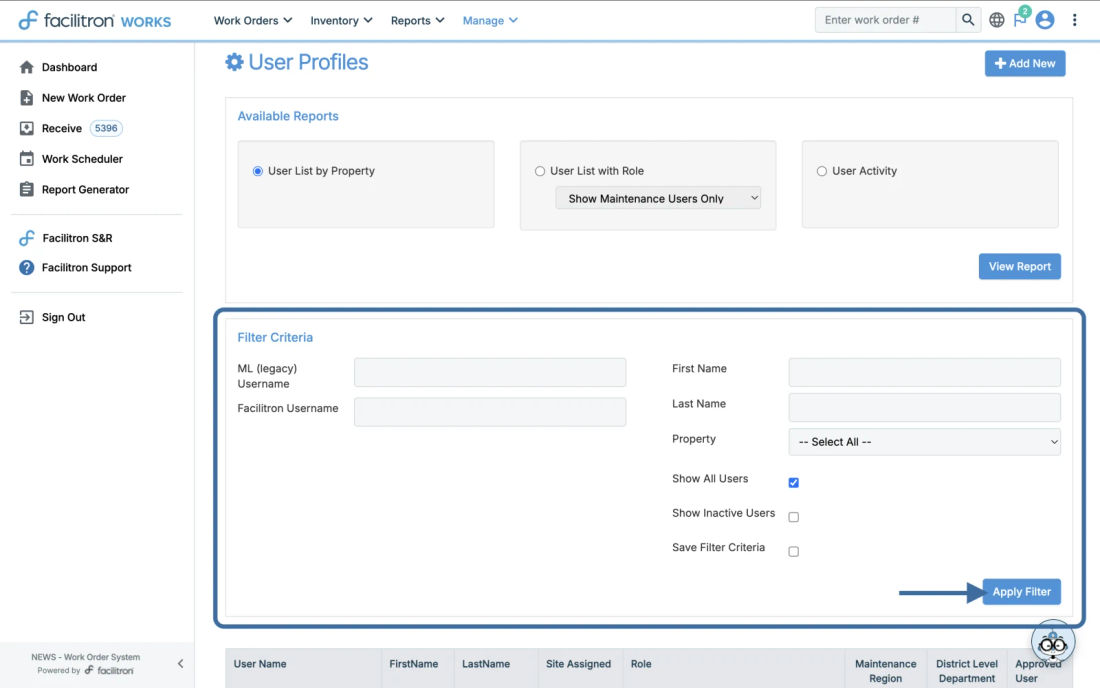
Upon logging in, navigate to the User Profiles page by going to Manage > People > Users. Select the user for whom you want to disable Tron AI.
Disabling Tron AI
Once you have found the user you’re looking for, click on their email address to access their profile. Once you’re in the user profile, scroll to the bottom of the profile and click Edit.

Uncheck AI Chat Enabled, then click Update. After clicking Update, Tron will no longer show on that person’s profile.

For additional assistance, please reach out to Facilitron Support at (800) 272-2962, or email us at support@facilitron.com.
Still need help?
If this article didn't solve your problem, our support team can help. We'll include this article so they have context.